

Appearance
Recording status, sales & buyers
An animal's status tells you — and your team — where it sits in your operation: active in the herd, listed in a sale, or sold. When an animal sells, you can record the sale event, the price and the buyer, all from its record.
Open the animal's record (select its NAME or M NUMBER on the Animals page), then find Status in the details block.
Steps
- On the animal's record, select Edit Status next to its current status.
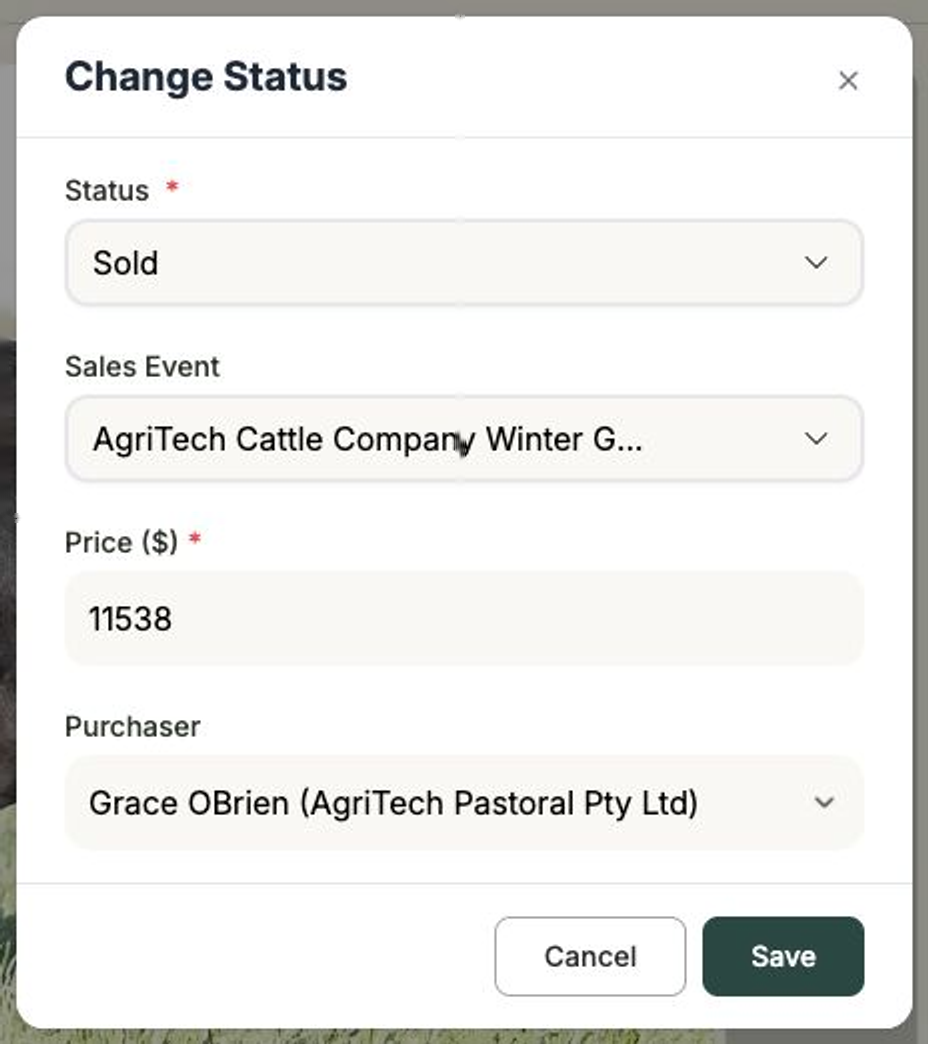
- In the Change Status window, choose a Status — Inactive, Active, In Sale or Sold.
- If you choose In Sale or Sold, a few more fields appear:
- Sales Event — pick the sale this animal belongs to (or leave it as None).
- Price ($) — enter the listed or sale price.
- Purchaser — choose the buyer from your clients, shown as their name and business.
- Select Save to apply the change.
Once an animal is In Sale or Sold, its record shows a sale info panel with the sale event, price and purchaser — and the purchaser links straight through to that client.
Filter your list by status
Back on the Animals page, the status tabs across the top — All, Sold, Active, In sale and Inactive — let you see just the animals at each stage at a glance.
Next steps
- Creating a sale event — set up a sale to assign animals to.
- Adding & arranging sale lots — organise animals into lots.
- The animal record — everything else on the record.
- Clients — manage the buyers you link to sales.