

Appearance
Inquiries
Inquiries are buyer enquiries that land in Frisbee for you to review. They come in from your public sale pages, your website contact form, field-day forms, and any embedded forms that use your public inquiry API — all in one place, ready for you to act on.
Open Inquiries from the left-hand menu to see every enquiry that's come in.
In this section
- Reviewing & converting inquiries — how to approve, reject, and turn an inquiry into a client.
How inquiries work
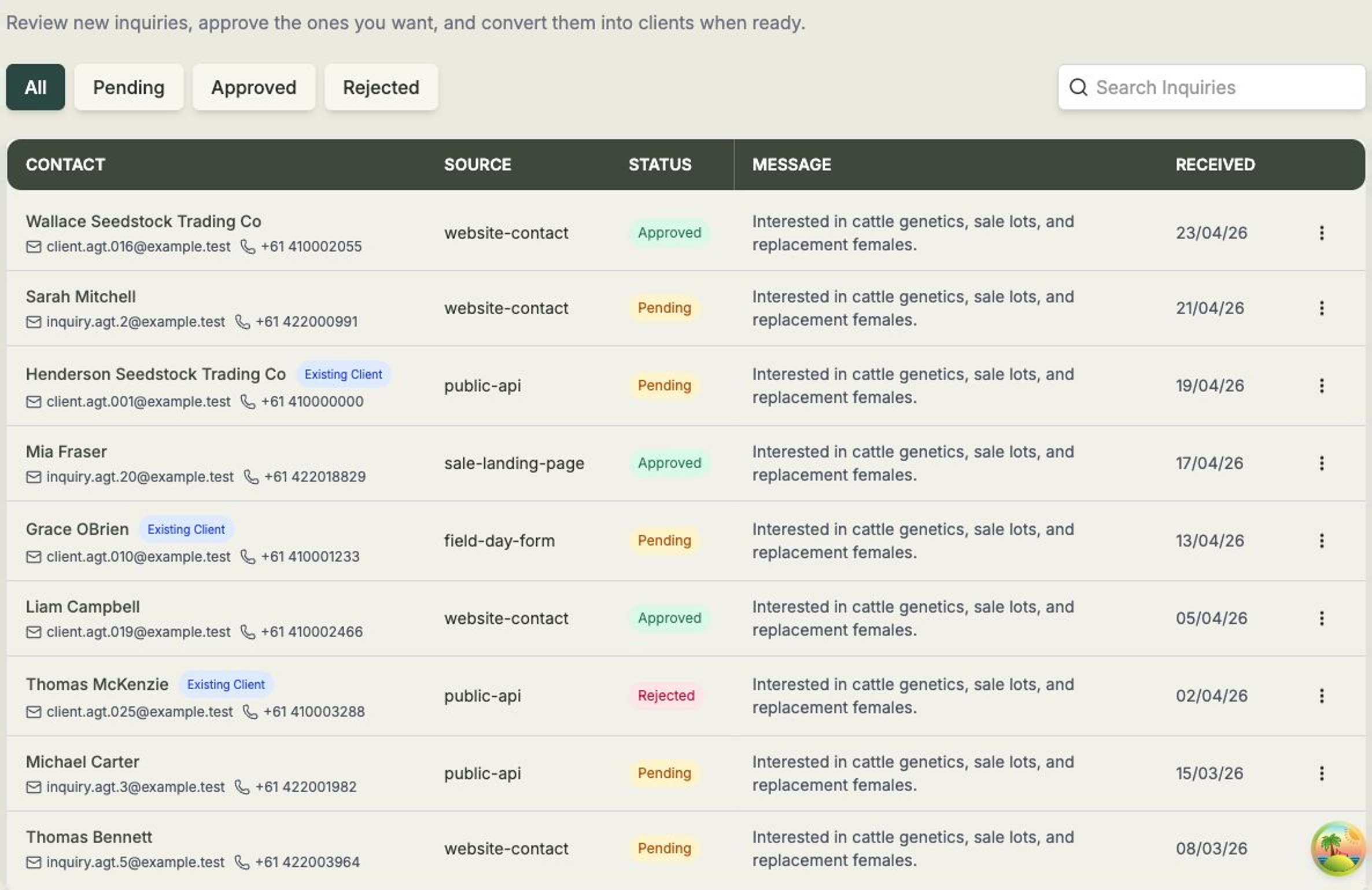
Each inquiry shows you who got in touch and what they said:
- Contact — the buyer's name, email and phone. If the enquiry matches someone you already have, an Existing Client badge appears so you know it's a familiar buyer.
- Source — where the inquiry came from, such as a sale landing page, your website contact form, a field-day form, or the public inquiry API.
- Status — whether the inquiry is Pending, Approved or Rejected.
- Message — what the buyer wrote.
- Received — the date it arrived.
Use the status tabs along the top — All, Pending, Approved and Rejected — to focus on the inquiries that need your attention.
New inquiries arrive as Pending
Every fresh inquiry starts life as Pending, so the Pending tab is the best place to start your day. Review each one, approve the buyers you're keen on, and convert them into clients when you're ready.