

Appearance
Choosing & changing your plan
Frisbee has a plan for every size of operation, and you can move between them whenever you need to. To get started, open Settings from the left-hand menu, choose Usage, then select View plans.
Steps
- Open Settings from the left-hand menu and choose Usage.
- Select View plans to open the Choose a plan dialog.
- At the top, pick how you'd like to pay. Switch between Monthly and Annual — annual billing saves you 15% — and between Recurring and One-time.
- Compare the plans side by side. Each card lists its price and what's included, such as your animal, client and user allowances and which features you unlock.
- Find the plan you want. The button on each card tells you what it will do — Upgrade to … for a higher plan, Downgrade to … for a lower one, or Current plan for the one you're already on.
- Select that button to go to the secure checkout, enter your card details, and confirm the change.
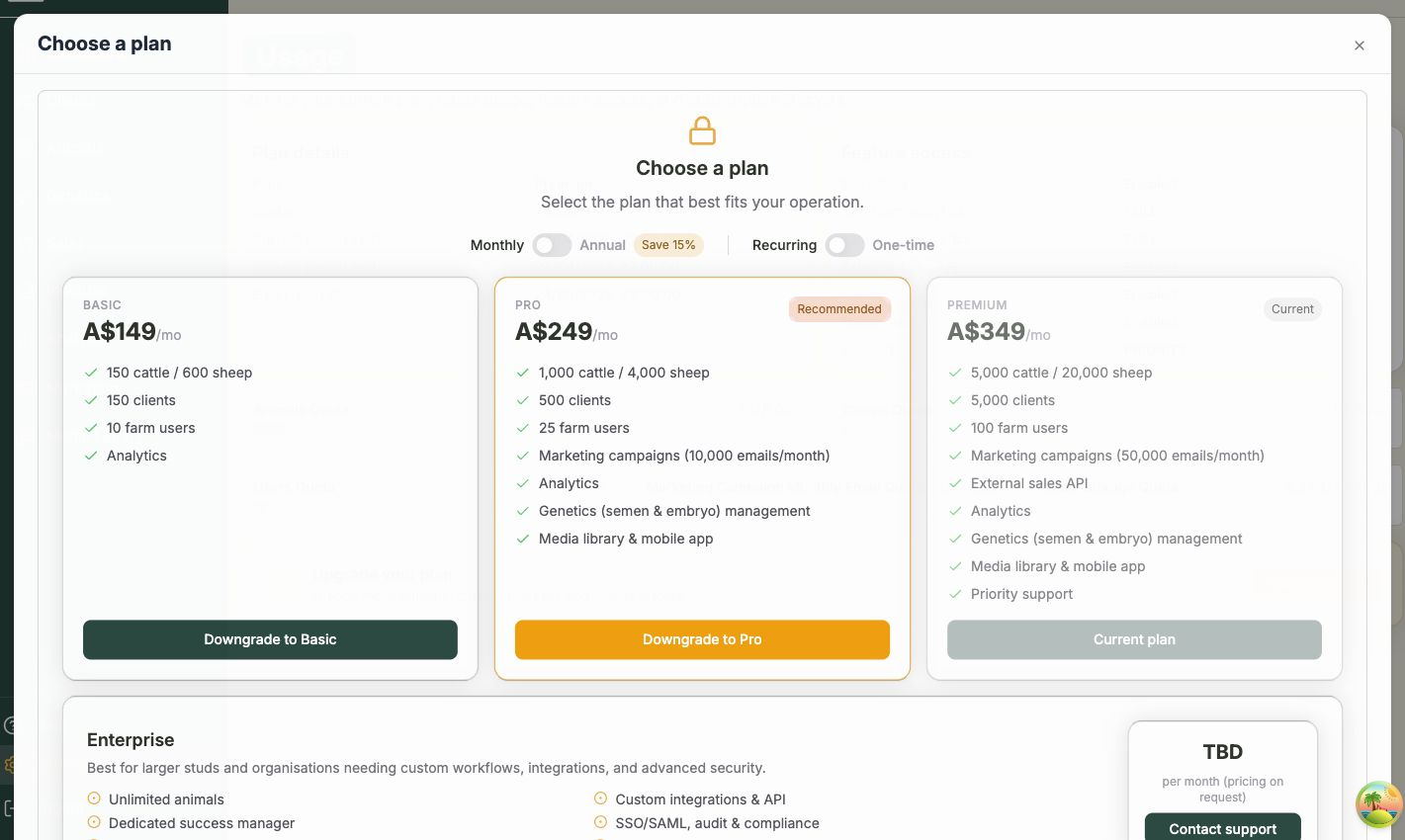
The plans at a glance
- Basic — for smaller herds: room for 150 cattle (or 600 sheep), 150 clients, 10 team members, plus Analytics.
- Pro (recommended) — 1,000 cattle (or 4,000 sheep), 500 clients, 25 team members, and marketing campaigns with 10,000 emails a month, Analytics, Genetics, and the media library and mobile app.
- Premium — 5,000 cattle (or 20,000 sheep), 5,000 clients, 100 team members, marketing with 50,000 emails a month, the external sales API, Analytics, Genetics, the media library and mobile app, and priority support.
- Enterprise — for the largest operations: unlimited animals, a dedicated success manager, onboarding and data migration, custom integrations, SSO, and tailored support. Pricing is on request.
Need Enterprise — or invoice billing?
The Enterprise card has a Contact support button instead of a checkout — get in touch and the Frisbee team will tailor a plan for you. If you'd prefer to be billed by invoice rather than card, contact Frisbee support and we'll sort it out.
After you change plans
Once your change goes through, your new feature access and higher quotas appear on the Usage page right away. If you upgraded to unlock a feature like marketing or the media library, it becomes available across the app immediately.
Related
- Plans & billing — where billing lives and what your plan controls.
- Usage & quotas — track your limits and feature access.